The business journey
We've made it easy for small businesses to support the causes they care about, through their sales. We wanted to share the inside scoop, so you can understand how everything works for your supporters.
The Business Donation Journey
Understanding how businesses donate through Work for Good helps charities support their partners, streamline due diligence, and ensure donations are processed correctly. This page explains each step of the journey from the moment a business signs up, to when your charity receives the donation.
How do businesses create an account?
It's quick, easy and free for businesses to sign up and create an account.

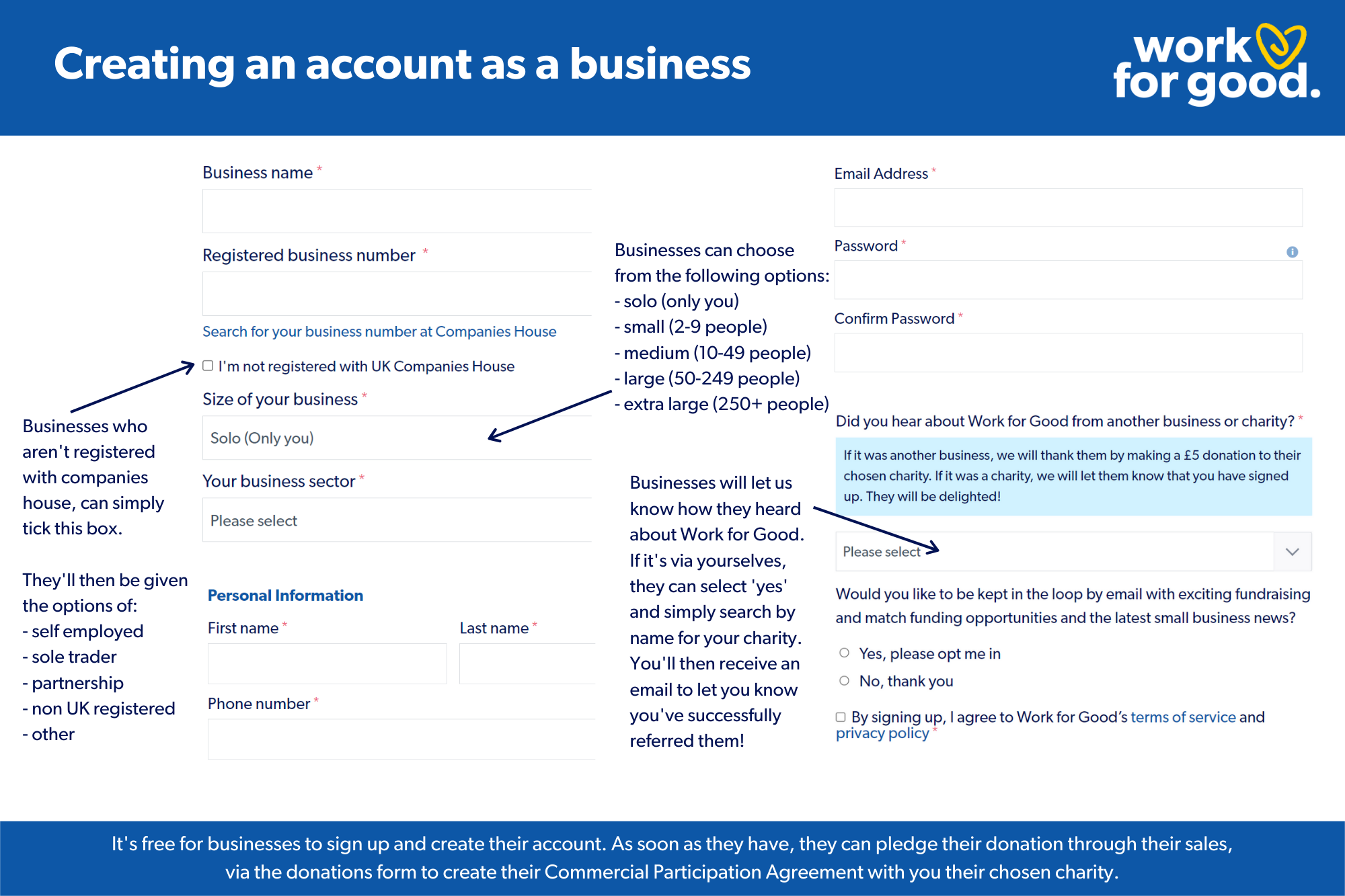
1. Business sign‑up
Businesses create a free Work for Good account and provide key information about their organisation. This includes:
• Business name and contact details
• Description of what the business does
• Website and social media links
• Company structure and trading activity
This information is important for charity due diligence, helping you understand who is fundraising for you and how their sales giving will work.
You will also find this information in your 'Businesses Supporting You' section in your Dashboard.
2. Choosing a charity and setting up sales giving Businesses can:
• Choose your charity directly if you have signposted them to Work for Good
• Use the Find a Charity page on the Work for Good website to discover and select a cause
Once they choose a charity, they set up how their sales will generate donations — for example, a % of every sale, a fixed £ amount, or a specific product campaign.
How do businesses create their agreement?
Once a business has created their Work for Good account, they can pledge their donation; creating their Commercial Participation Agreement with their chosen charity, via the donations form - this is where the magic happens! See how we guide your supporters through the donations form, in a simple step-by-step way here.
3. Creating the CPA (Commercial Participation Agreement)
The CPA is created automatically when a business completes the donations form.
It is a legal requirement for sales‑linked fundraising and ensures transparency for both the charity and the business.
On this page, we explain the CPA only as part of the journey — you can find more detailed CPA guidance in the next section of the toolkit.
How are commercial participation statements used?
As soon as a business has pledged a donation, they MUST create a Commercial Participation (solicitation) statement. For absolute ease, Work for Good generates this statement for your supporters, which is sent to them via email and also appears on the ‘Thank you’ screen; once they've confirmed that they understand the Commercial Participation Agreement as part of our T&C's. Check out an example of how the statement appears and how it can be displayed at the point of sale here.
How can businesses publicise their giving?
Publicising their giving is a great way for a business to engage their customers or clients with their fundraising campaign. This will not only help them raise more funds for their chosen charity but is also a great way for them to demonstrate their values. We’ve pulled together our top tips on how businesses can do this here.
4. Making a donation
When the campaign ends or the business is ready to pay, they complete the donation through their Work for Good dashboard.
Work for Good and Stripe fees are automatically deducted from the donation before the balance is paid to the charity.
For full details, see our Fees page.
5. What happens next
Once the donation is paid:
• Work for Good processes the payment automatically through our Stripe payment system
• The donation is tracked against the business’s CPA • Both the business and the charity receive notifications
• The donation appears in your charity dashboard for reconciliation where you can also download reports for your own records
What support is available for businesses?
Your sales fundraisers receives support and advice from our dedicated team, alongside access to a specific toolkit to help them publicise their giving and maximise their fundraising.
6. What the business sees
Businesses see:
• Their CPA
• Their donation form
• A confirmation screen
• A receipt and email confirmation
• Their public profile (if opted in)
7. What the charity sees
Charities see:
• Notifications when a business pledges or pays
• Donation details (amount, campaign, business name)
• Reconciliation information
• A record of all CPAs linked to your charity
